
With 3CX Phone System, you are able to perform 'Conference Calls' where you can invite multiple people to a single call.
The conference call is difference to the 'Web Meeting' and 'Schedule Conference'. For these processes, please refer to:
This process is strictly AD-HOC.
To start a Conference Call.
Promote an existing call to a conference call
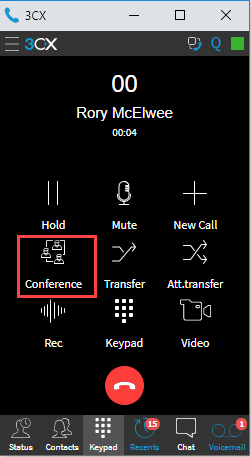
1. While on an existing call, press the 'Conference' button.
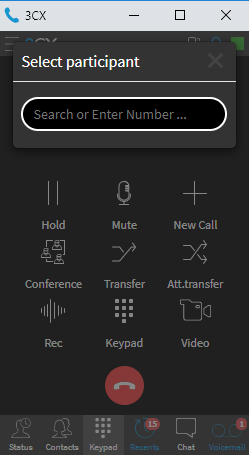
2. You will be presented with a popup to add Phone Numbers or Extensions to the Conference Call.
3. Once the recipient answers the call, they will be added to the conference call directly.
Please note that these instructions reference using the Chrome Web Browser and the Chrome 3CX extension.
Comments
0 comments
Please sign in to leave a comment.