
To be able to get and itemised call log for your 3CX phone system, first you will need to log into the 3CX management Console.
Please follow these instructions to access the Management console.
https://support.m1it.com.au/hc/en-us/articles/360002302915-3CX-Logging-into-the-3CX-Management-Console
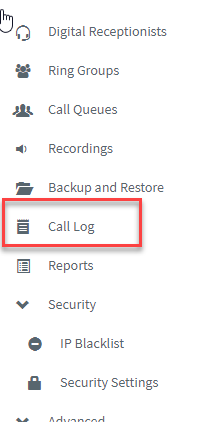
Once you are logged into the Management Console you will fin the option for 'Call Log' on the left side options.
From this window you can search for any item within the Call Log. Even partial numbers.
The filter option will give you multiple option to filter down your search parameters.
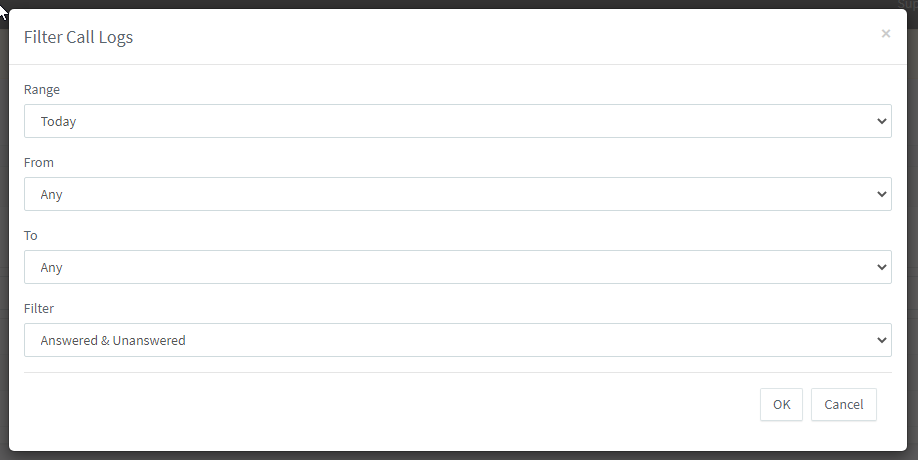
Range
- Today
- Yesterday
- Last Week
- last 7 Days
- Last Month
- Last 30 days
- Last 90 days
* The maximum range that you can display is the last 90 days.
From
There are multiple option here. You can select multiple extensions or just one.
Can select all internal or external calls also.
e.g. Extensions 01, 04, 10
To
There are multiple option here. You can select multiple extensions or just one.
Can select all internal or external calls also.
e.g. Extensions 01, 04, 10
Filter
Answered or Unanswered calls.
When you are displaying the Call Log based on your filter and search you can the export this to a CSV file.
Click the export button and then enter your email address for the report to be delivered to.
Shortly after you will receive a download link for you to download the CSV report file.
If you have any questions or Issues with this process, please contact M1IT Systems.
Comments
0 comments
Please sign in to leave a comment.