
Adding a note to the Timeline of a record or Entities
- Select the Element for the record that you wish to add the note against. Eg. Accounts, Contact, Opportunities or Leads.
- Select the Record that you wish to add the Note against
- Within the Summary of the record, there will be the ‘Timeline’ element. This is where Notes and Activities can be added to the Record.
- Within the ‘Timeline’ element, click the Plus symbol to show the drop-down for the available option to add to the Timeline.
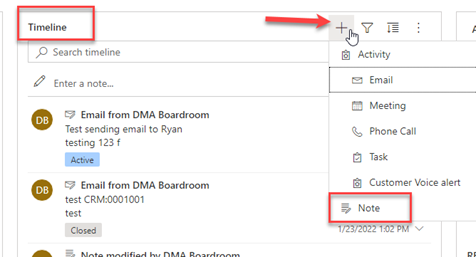
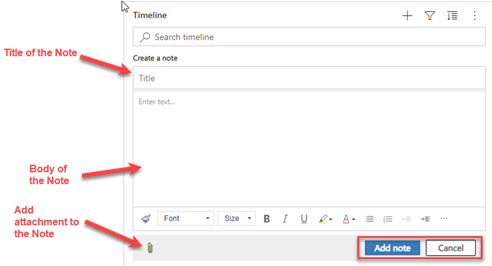
- After clicking ‘Note’ the Timeline element will expand to allow you to enter the details of the Note. Several options and fields are displayed.
- Title
- Content
- Text formatting
- Add an attachment to the Note
- Once added, you will see the new note added to the Timeline.
Comments
0 comments
Please sign in to leave a comment.